OCR vs Document AI: Which One Fits Your Finance Workflow
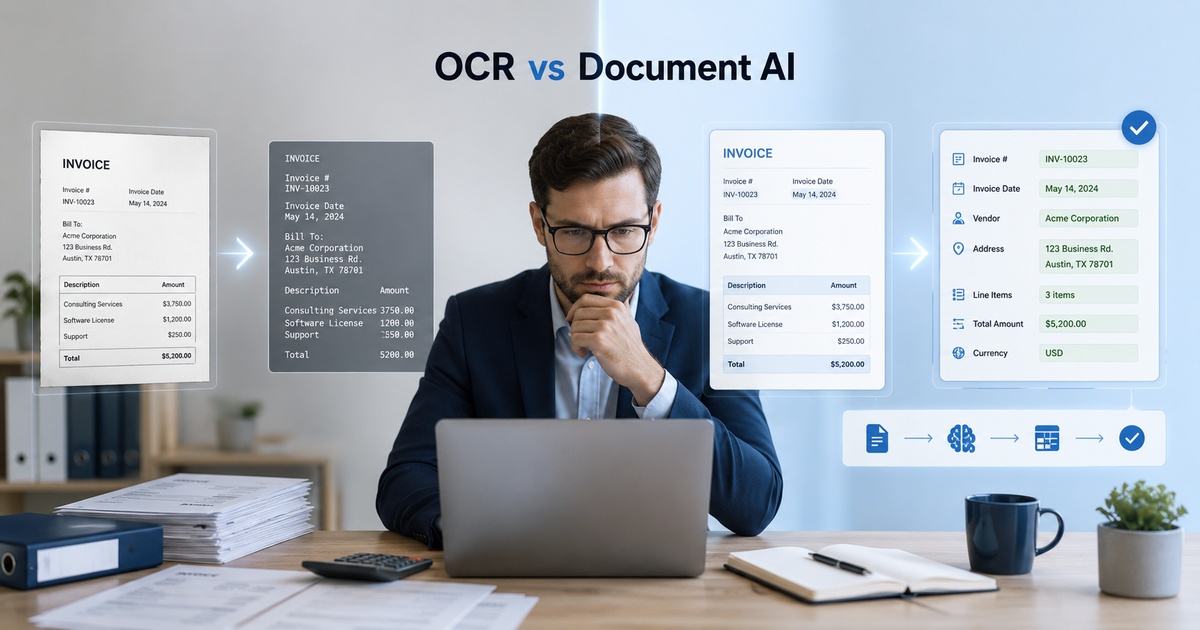
When finance teams set out to automate document processing, they quickly hit a choice that sounds technical but has real practical consequences: plain OCR or document AI? The terms are often used loosely, and vendors blur them, but they describe genuinely different capabilities, and choosing the wrong one means either overpaying for power you do not need or under-buying and drowning in manual cleanup. The right choice depends on how varied and messy your documents are, your volume, and how much accuracy you need. Here is how to tell them apart and pick the one that fits your workflow.
What OCR does
OCR, optical character recognition, converts images of text into machine-readable text. Point it at a scanned invoice and it gives you back the words and numbers as data you can work with. That is powerful and mature, but on its own OCR is largely about reading characters, not understanding meaning. Classic OCR tells you what the text says; it does not inherently know which number is the total, which is the tax, or which is the invoice date, especially when layouts vary. For consistent, structured documents in a fixed format, OCR with some rules can be enough; for varied layouts, it leaves a lot of interpretation to you.
What document AI does
Document AI builds on OCR’s reading with a layer of understanding. It does not just extract text; it identifies what the pieces mean, this is the vendor, this is the total, this is the due date, even across documents with different layouts it has not seen before. It can handle the messy variety of real-world finance documents, invoices from hundreds of suppliers each formatted differently, far better than rules-on-OCR, because it learns the structure rather than relying on fixed positions. The trade-off is that it is more sophisticated and typically costs more, and like any AI it is probabilistic rather than perfectly deterministic.
The key difference
Put simply, OCR reads, document AI understands. OCR turns an image into text; document AI turns a document into structured, labelled data ready to use. For finance, the practical question is how much your documents vary. If every document you process has the same fixed layout, OCR plus rules can extract the fields reliably and cheaply. The moment you are dealing with many different formats, hundreds of suppliers, varied invoice layouts, changing forms, rule-based OCR becomes brittle and high-maintenance, and document AI’s ability to understand rather than memorise positions pays off. This is the same understanding that powers good invoice automation under the hood.
Which fits your finance workflow
Match the tool to your documents and volume. If you process a steady stream of identically formatted documents, OCR with extraction rules is often sufficient and economical. If you handle varied, unpredictable layouts from many sources, which is the reality for most accounts payable, document AI will save far more manual cleanup despite the higher cost. Volume matters too: at low volume, manual handling of exceptions is cheap, so simpler tools suffice; at high volume, the cost of poor extraction multiplies, justifying the more capable option. Most modern finance automation tools use document AI precisely because real invoices are too varied for plain OCR, so for a typical AP workflow, document AI is usually the better fit.
Setting accuracy expectations
Whichever you choose, set realistic accuracy expectations and design for them. Neither OCR nor document AI is perfect on messy documents, poor scans, unusual layouts, and handwriting all reduce accuracy, so plan for a human review step on exceptions and low-confidence extractions rather than assuming flawless output. Document AI typically handles variety better, but it still makes mistakes and, being probabilistic, can be confidently wrong, which makes verification of critical fields essential in a finance context where errors have real consequences. The right mindset is assisted extraction with review, not unattended perfection, the same discipline that underpins any reliable accounts payable automation setup.
A simple way to decide
If you want a quick way to choose rather than a long evaluation, two questions usually settle it. First, how consistent are your documents? If nearly every document you process shares one fixed layout, plain OCR with extraction rules can read the fields reliably and cheaply, and document AI may be more power than you need. If your documents vary, many suppliers, changing forms, different formats, rule-based OCR will be brittle and high-maintenance, and document AI earns its cost.
Second, what does an extraction error cost you? At low volume with cheap manual checking, simpler tools are fine because catching the occasional miss is easy. At high volume, or where errors flow into payments and financial records, the cost of poor extraction multiplies, and the more capable option pays for itself. For most accounts payable workflows, varied invoices at meaningful volume, the answer lands on document AI, which is why modern finance tools lean that way. But there is no shame in OCR where your documents are uniform and your volume modest; the right tool is the one that matches your reality, not the most advanced one available.
Frequently asked questions
What is the difference between OCR and document AI?
OCR converts images of text into machine-readable text, it reads characters but does not inherently understand what they mean. Document AI builds on that reading with a layer of understanding, identifying what each piece is, the vendor, total, or due date, even across layouts it has not seen before. In short, OCR reads while document AI understands and turns a document into structured, labelled data ready to use.
Should my finance team use OCR or document AI?
It depends on how varied your documents are and your volume. For a steady stream of identically formatted documents, OCR with extraction rules is often sufficient and cheaper. For varied, unpredictable layouts from many sources, the reality for most accounts payable, document AI saves far more manual cleanup despite the higher cost. At high volume, poor extraction multiplies in cost, which further justifies document AI. Most modern finance tools use document AI for exactly this reason.
How accurate are OCR and document AI for invoices?
Both can handle most well-scanned invoices well, but neither is perfect on messy real-world documents, poor scans, unusual layouts, and handwriting reduce accuracy. Document AI typically handles varied layouts better than rule-based OCR, but being probabilistic it can still be confidently wrong. In finance, where errors have real consequences, plan for a human review step on exceptions and verify critical fields before they post. Treat extraction as assisted automation with review, not as unattended perfection you can safely walk away from.

Written by gautam995576@gmail.com
AI automation editor focused on workflow design, tool selection, privacy checks, and operational clarity.
Related automation guides
Contract Review AI Tools: Practical Buyer Guide
A practical buyer’s guide to contract review AI: what it can and cannot do, how to evaluate accuracy and risk, and where…

Accounts Payable Automation Checklist for Growing Teams
A practical accounts payable automation checklist for growing teams: approvals, controls, exceptions, and the steps that prevent costly payment mistakes.
Invoice Automation Tools Guide for Finance Teams
A finance team’s guide to invoice automation: what these tools actually do, how to evaluate accuracy and fit, and how to roll…