Invoice Automation Tools Guide for Finance Teams
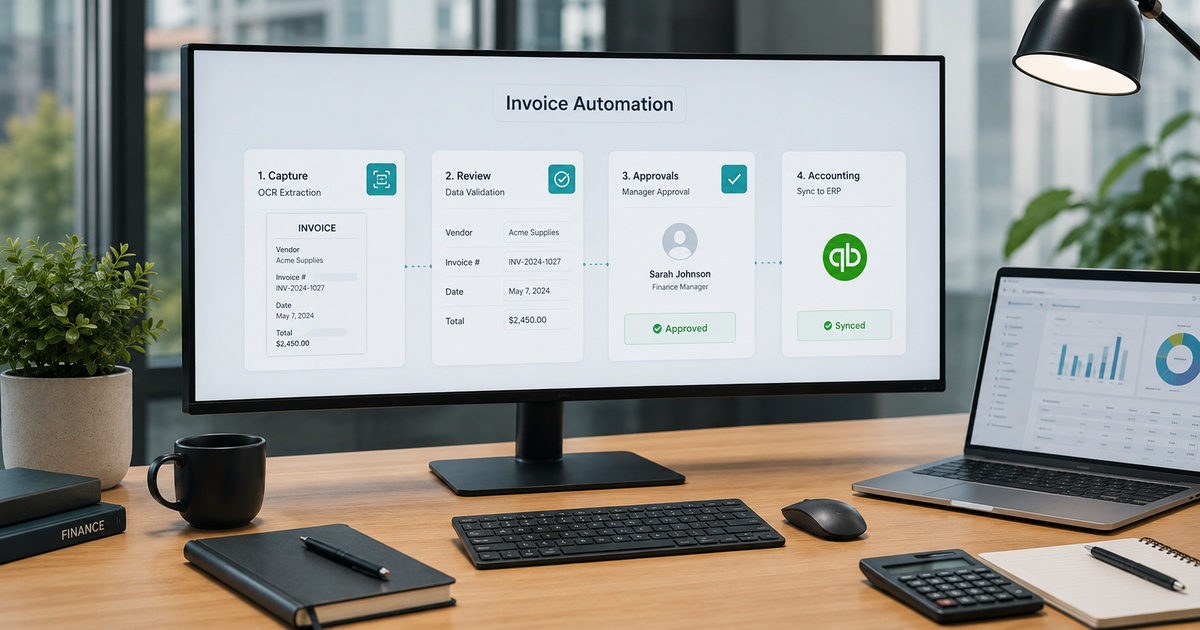
Processing invoices by hand, keying in data, chasing approvals, matching against purchase orders, is slow, error-prone work that scales badly as a company grows. Invoice automation promises to take most of it off your plate, but the category is broad and the tools vary widely in what they actually do and how well they do it. For a finance team, the risk is buying on a slick demo and discovering the accuracy or fit is wrong for your invoices. This guide explains what invoice automation does, how to evaluate it, and how to roll it out without creating new problems.
What invoice automation actually does
At its core, invoice automation captures the data from incoming invoices, however they arrive, validates and codes it, routes it for approval, and feeds it into your accounting or ERP system, ideally with matching against purchase orders and receipts. Done well, it removes most of the manual keying, speeds up approvals, cuts errors, and gives finance visibility into what is owed and when. The variation between tools is in how accurately they capture data from messy real-world invoices, how well they handle approvals and exceptions, and how cleanly they integrate with the systems you already run.
Types of invoice automation tools
Tools cluster into a few broad types, and knowing which you need narrows the field fast.
- Built-in accounting features: capture and approval built into your existing accounting or ERP software, simplest if it covers your needs.
- Dedicated AP automation platforms: specialist tools focused on the full accounts payable workflow, capture, approval, payment, often with stronger matching and controls.
- Capture-focused tools: data extraction from documents that feeds your existing process, useful when capture is your main bottleneck.
Larger volumes and more complex approval or matching needs generally push you toward dedicated platforms; simpler needs are often met by what is already in your accounting software.
How to evaluate invoice automation
Look past the demo and weigh what determines whether it works on your actual invoices.
- Capture accuracy: how reliably it extracts data from your real, messy invoices, not clean samples, since errors create more work than they save.
- Integration: how cleanly it connects to your accounting or ERP system, the difference between automation and double entry.
- Approval workflows: whether it matches how your approvals actually work, including thresholds and delegations.
- Matching: support for purchase-order and receipt matching if you need it.
- Controls: audit trails, segregation of duties, and the safeguards finance and auditors require.
How to roll it out without chaos
The fastest way to fail is to switch everything at once. Start with a defined slice, one vendor type, one entity, or your highest-volume straightforward invoices, run it in parallel with your existing process at first, and check the captured data and postings carefully before trusting them. Expand only as accuracy and the workflow prove themselves. Because invoice automation feeds your financial records, the cost of getting it wrong is high, so a careful, staged rollout with real verification is not optional. This pairs directly with a solid accounts payable automation checklist to make sure controls keep pace with the new speed.
Accuracy, controls, and the human role
No invoice automation is perfect, and treating it as if it were is how errors and even fraud slip through. Capture accuracy is never one hundred percent on messy real-world documents, so a human review step for exceptions and low-confidence captures is essential, not optional. Controls matter just as much as speed: maintain approval thresholds, segregation of duties, and audit trails, because automating payments without controls is how a mistyped or fraudulent invoice gets paid. The underlying capture technology, and how to think about its accuracy, is worth understanding, which is why our look at OCR versus document AI is a useful companion. Used with proper review and controls, invoice automation is a clear win; used as blind set-and-forget, it is a liability.
Common invoice automation mistakes
A few predictable mistakes turn invoice automation from a time-saver into a source of errors. The first is buying on a polished demo that processed clean, well-formatted sample invoices, then discovering capture accuracy collapses on your real, messy supplier documents. Always trial on your own invoices, including the awkward ones, before committing. The second is poor integration: a tool that captures beautifully but does not post cleanly into your accounting system just moves the manual work from data entry to reconciliation.
The third, and most dangerous, is removing human review to maximise the automation rate, letting low-confidence captures and exceptions flow straight through to payment. That is precisely how errors and fraudulent invoices slip past. The fourth is neglecting controls in the rush to be faster, weakening approval thresholds or segregation of duties because the automated flow made them feel like friction. Each of these is avoidable by remembering what invoice automation is for: removing the tedious keying while a human still reviews exceptions and the controls that protect the company’s money stay firmly in place.
Frequently asked questions
What does invoice automation actually do?
It captures data from incoming invoices however they arrive, validates and codes it, routes it for approval, and feeds it into your accounting or ERP system, often matching against purchase orders and receipts. Done well, it removes most manual keying, speeds approvals, cuts errors, and improves visibility into what is owed. Tools vary mainly in capture accuracy on messy invoices, how they handle approvals and exceptions, and how cleanly they integrate with your existing systems.
How do I choose an invoice automation tool?
Match the tool type to your needs: built-in accounting features for simpler needs, dedicated AP platforms for higher volumes and complex approvals or matching, or capture-focused tools when extraction is your bottleneck. Then evaluate capture accuracy on your real invoices, integration with your accounting system, approval-workflow fit, matching support, and controls like audit trails and segregation of duties. Trial on your actual documents rather than trusting a demo on clean samples.
Is invoice automation accurate enough to trust?
Modern tools are accurate enough to remove most manual work, but never perfect on messy real-world invoices, so a human review step for exceptions and low-confidence captures is essential. Just as important are controls, approval thresholds, segregation of duties, and audit trails, since automating payments without them risks paying a mistyped or fraudulent invoice. Treated as assisted automation with review and controls, it is reliable; treated as blind set-and-forget, it is a liability.
How much time does invoice automation save?
It varies with your volume and how manual your current process is, but the biggest savings come from eliminating data entry and speeding approvals on the bulk of routine, clean invoices, while exceptions still need human attention. Rather than expecting every invoice to be touchless, expect automation to handle the straightforward majority and route the rest for review. Measure the real saving on your own invoice mix before and after, since clean-sample demos overstate it.

Written by gautam995576@gmail.com
AI automation editor focused on workflow design, tool selection, privacy checks, and operational clarity.
Related automation guides
Contract Review AI Tools: Practical Buyer Guide
A practical buyer’s guide to contract review AI: what it can and cannot do, how to evaluate accuracy and risk, and where…
Accounts Payable Automation Checklist for Growing Teams
A practical accounts payable automation checklist for growing teams: approvals, controls, exceptions, and the steps that prevent costly payment mistakes.
OCR vs Document AI: Which One Fits Your Finance Workflow
OCR or document AI for your finance workflow? How they differ, where each works best, and how to choose based on your…