AI Ticket Triage: Practical Setup Guide for Support Teams
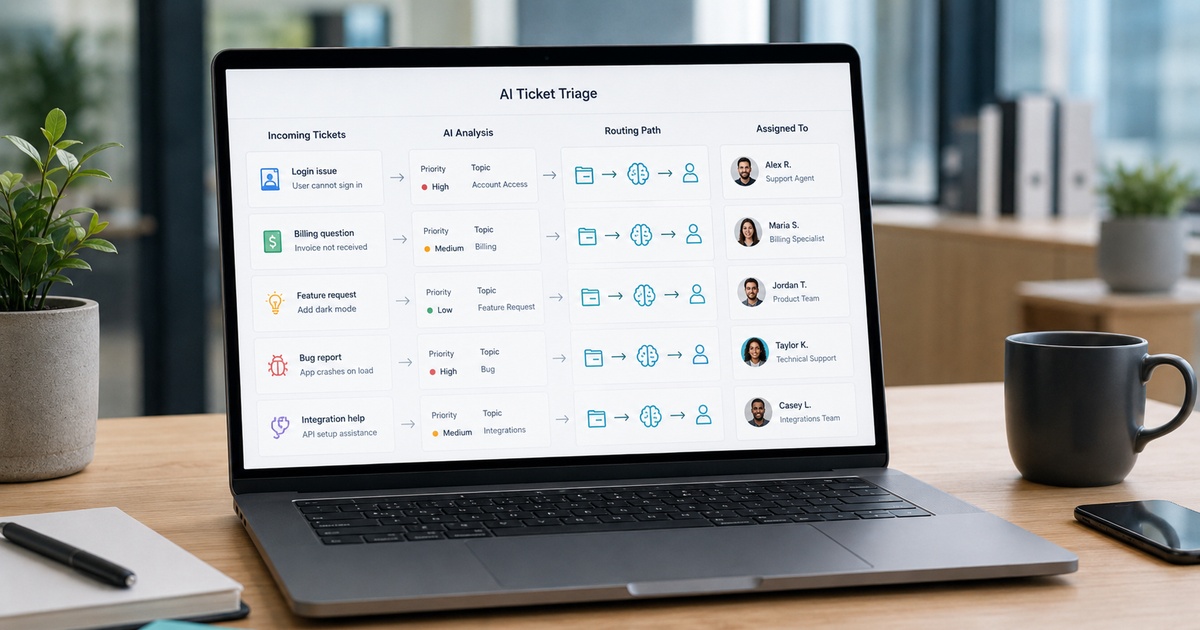
Before an AI ever answers a customer, there is a quieter, often more valuable job it can do: triage. Sorting, tagging, prioritising, and routing incoming tickets is tedious, error-prone work when done by hand, and it is exactly the kind of task AI handles well. Good AI triage means urgent issues surface fast, tickets reach the right person the first time, and your team stops wasting energy on manual sorting. It is also lower-risk than customer-facing automation, since a human still handles the actual response. Here is a practical guide to setting it up so it genuinely helps rather than quietly mis-routing things.
What good triage actually does
AI triage reads each incoming ticket and applies the routing decisions a knowledgeable agent would: it identifies the topic, gauges urgency and sentiment, tags the ticket, and sends it to the right queue or person. Done well, it removes the manual sorting bottleneck, cuts the time a ticket waits before reaching someone who can help, and catches the urgent or angry messages that should not sit in a general queue. Crucially, because triage informs a human rather than replacing one, its mistakes are usually recoverable, which makes it a sensible, high-value first step into support AI.
Before you start: get your categories right
AI triage is only as good as the structure you give it, so sort out your taxonomy before configuring anything. Define a clear, not-too-long list of ticket categories that map to how your team actually works and how tickets get routed. Decide what “urgent” genuinely means for your business, so priority is consistent rather than arbitrary. Confused, overlapping, or excessive categories produce confused triage, so simplify ruthlessly. This step is unglamorous but decisive: a clean category and routing model is what lets the AI make good decisions, and it pays off for your human process too. It pairs naturally with a well-organised help center, the same foundation behind help center readiness.
Setting up routing and tagging
With a clean taxonomy in place, configure the triage itself in deliberate stages.
- Start by having the AI tag and categorise tickets without routing them, so you can check its accuracy safely before it changes anything.
- Define routing rules from those tags: which categories go to which queues, teams, or specialists.
- Add urgency and sentiment detection so high-priority and frustrated-customer tickets are flagged and surfaced.
- Decide handling for low-confidence cases, the AI should route uncertain tickets to a general queue or a human, not guess.
Prioritisation and escalation
Routing gets a ticket to the right place; prioritisation makes sure the important ones are seen first. Use the AI’s read of urgency and sentiment to surface tickets that need a fast response, an outage report, a churn-risk complaint, a VIP customer, rather than letting them queue behind routine questions. Build clear escalation paths so genuinely urgent issues reach a human quickly and are never buried. The aim is that your team’s attention is always directed to where it matters most, automatically, instead of someone manually scanning the queue. Get this right and triage stops being overhead and becomes a genuine response-time advantage.
Test, monitor, and refine
Like any automation, triage needs watching, especially early. Run it in a tagging-only or shadow mode first and compare its decisions against what your team would have done, correcting the taxonomy and rules before it routes live tickets. After launch, monitor mis-routes and review a sample of its decisions, since silent mis-routing is the main risk, and feed corrections back in. Watch for category drift as your product and ticket mix change, and update the model accordingly. This is the same outcome-focused discipline behind measuring support AI honestly: judge triage by whether tickets reach the right people faster, not by how many it tagged. Refined over a few weeks, AI triage becomes one of the most reliable, lowest-risk wins in support automation.
Where triage fits in the bigger picture
Triage is most powerful when you see it as one layer in a larger support system rather than a standalone trick. Upstream, a good help center and self-service deflect the simplest questions before they ever become tickets. Triage then sorts what remains, ensuring the right human, or a customer-facing AI where appropriate, picks up each ticket quickly and with context. Downstream, honest measurement tells you whether the whole system is actually helping customers or just moving tickets around faster.
Seen this way, triage is the connective tissue that makes the rest work: even an excellent support team loses time and drops urgent issues if tickets arrive in an undifferentiated pile. Because it informs humans rather than replacing them, it is also the safest place to build confidence in support automation before attempting anything customer-facing. Many teams find that getting triage right, cleaner routing, faster escalation, less manual sorting, delivers more day-to-day value than a flashy answer bot, and it does so with a fraction of the risk.
Frequently asked questions
What is AI ticket triage?
AI ticket triage uses AI to read incoming support tickets and make the sorting decisions a knowledgeable agent would: identifying the topic, gauging urgency and sentiment, tagging the ticket, and routing it to the right queue or person. It removes manual sorting, speeds up response times, and surfaces urgent issues. Because it informs a human rather than replacing the actual response, it is lower-risk than customer-facing automation and a sensible first step.
How do I set up AI ticket triage?
First define a clean, not-too-long set of categories and a clear meaning of urgency that map to how your team routes work. Then configure the AI to tag tickets first without routing, check its accuracy, add routing rules from those tags, and enable urgency and sentiment detection. Route low-confidence cases to a human rather than guessing. Test in a shadow mode, then monitor mis-routes and refine the taxonomy and rules over time.
Is AI ticket triage risky?
It is lower-risk than customer-facing support AI because a human still handles the actual response, so most triage mistakes are recoverable mis-routes rather than wrong answers to customers. The main risk is silent mis-routing, so test in a tagging-only or shadow mode first, route low-confidence tickets to a human, and monitor decisions after launch. With sensible setup and review, triage is one of the safest, highest-value support automations.
Does AI ticket triage replace support agents?
No, triage assists agents rather than replacing them. It removes the manual sorting, tagging, and routing that slow teams down, so agents spend their time responding to customers instead of organising the queue. The actual responses, and all the judgement-heavy work, stay with humans. Most teams find triage makes their existing agents noticeably faster and more focused, which is a different goal from reducing headcount.

Written by gautam995576@gmail.com
AI automation editor focused on workflow design, tool selection, privacy checks, and operational clarity.
Related automation guides
Help Center Readiness Checklist Before Adding an AI Chatbot
Before you add an AI chatbot, get your help center ready. A checklist to audit content, fill gaps, and set the support…
How to Measure Support AI Deflection Honestly
Deflection rates are easy to game. How to measure support AI honestly, the metrics that mislead, and what actually tells you whether…
Intercom Fin vs Zendesk AI vs Ada: Support AI Decision Guide
How to choose between Intercom Fin, Zendesk AI, and Ada for support automation, comparing fit, setup effort, and how each handles your…