AI Meeting Notes Workflow: From Call to Follow-Up Task
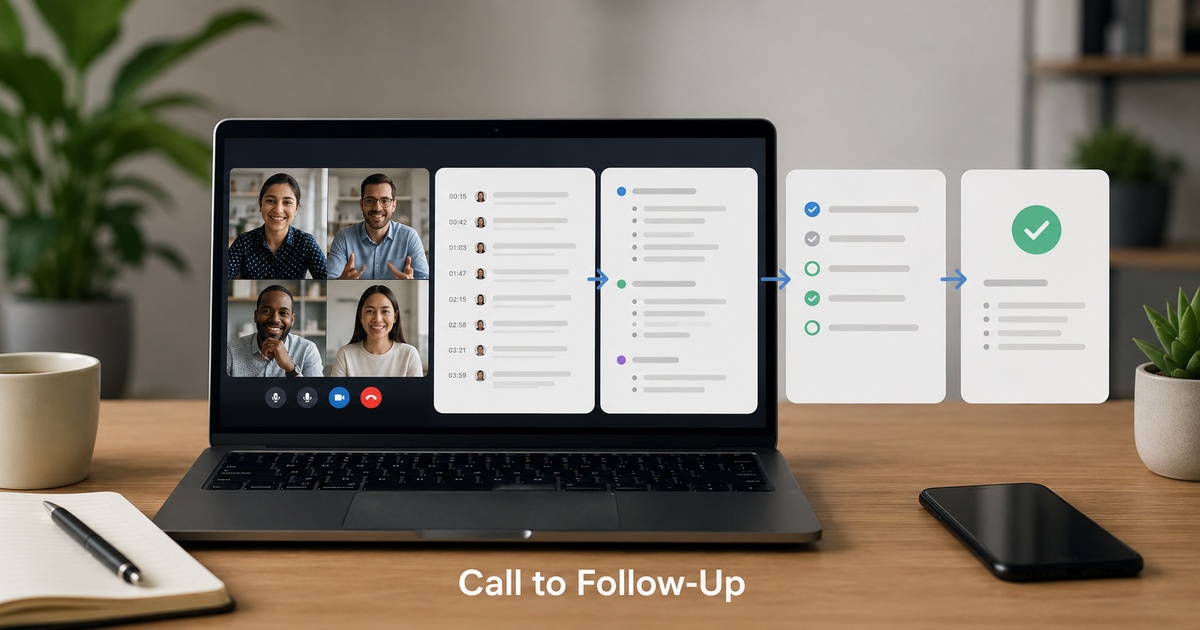
AI meeting notes tools are excellent at producing transcripts and summaries, and almost useless if that is where it ends. A perfect summary that sits in a folder nobody opens changes nothing; the value of a meeting is in what happens afterward, and that is exactly the part most teams leave to chance. A good meeting notes workflow closes the gap between the conversation and the action, turning a call into a clean summary and then into follow-up tasks that actually get done. Here is how to build that workflow so meetings reliably produce outcomes rather than just archived recordings.
Why notes alone are not enough
The trap with meeting AI is mistaking capture for completion. Recording and summarising a meeting feels productive, but it only documents what was said; it does not ensure anything happens. The classic failure is a team that diligently records every meeting and still drops the same balls, because action items live in summaries no one revisits, decisions are not communicated to people who missed the call, and follow-ups depend on someone remembering. The notes are a means, not an end. A workflow is what converts that captured information into communicated decisions and tracked tasks, which is where meetings actually pay off.
The workflow: capture to action
Think of the workflow as a short pipeline with clear stages, each handing off cleanly to the next.
- Capture: the meeting is recorded and transcribed reliably, without anyone scrambling to take notes.
- Summarise: AI produces a concise summary with decisions and action items clearly separated from discussion.
- Distribute: the summary reaches everyone who needs it, including those who were not on the call.
- Action: action items become tracked tasks with owners, in the tool your team actually uses.
- Follow up: tasks are tracked to completion, so nothing relies on memory.
From transcript to a useful summary
The summary is the hinge of the whole workflow, so make it actionable rather than just a recap. A useful meeting summary clearly separates three things: decisions made, action items with owners, and key discussion points, because a wall of summarised conversation is nearly as hard to act on as the full transcript. Most AI tools can be guided toward this structure, and it is worth setting up, because a summary that surfaces who-owns-what is one that drives action, while a generic paragraph just gets skimmed and forgotten. The goal is a summary someone can glance at and immediately know what was decided and what they need to do, which the right meeting AI tool helps produce but your workflow has to demand.
From summary to tracked tasks
This is the step that separates teams who get value from meeting AI from those who just accumulate transcripts: getting action items out of the summary and into wherever your team actually tracks work. The smoothest setups push action items directly into your task or project tool, with an owner attached, so they enter the same system as the rest of your work rather than living in a separate notes silo. Where direct integration is not available, a quick deliberate step to transfer action items into your task tool still beats leaving them in the summary. The principle is that an action item only counts once it is a tracked task with an owner; until then it is just a good intention recorded in a document.
Closing the loop
A workflow is only as good as its weakest handoff, so make sure the loop actually closes. Distribute the summary promptly to everyone affected, including those who missed the meeting, so decisions are communicated rather than assumed. Ensure tasks are not just created but tracked to completion in your normal process, so the meeting’s outputs get the same follow-through as any other work. And keep the workflow light enough to use every time, because a process people skip when busy is no process at all. Done consistently, this turns meetings from time that disappears into a reliable engine of decisions and completed actions, the same leverage that well-chosen productivity automations give a stretched team. The tool captures; the workflow delivers.
A simple setup to copy
If you want a concrete starting point, a minimal version of this workflow takes very little to set up and immediately beats the usual chaos. Pick a meeting AI tool and let it record and summarise automatically. Configure or prompt it to produce summaries that separate decisions, action items with owners, and discussion, rather than a generic recap. After each meeting, do one deliberate thing: move the action items into wherever your team tracks work, with an owner on each.
That single habit, summary in, tasks out, is the whole difference between meetings that produce outcomes and meetings that produce archives. Once it is routine, look for an integration that pushes action items into your task tool automatically, removing even that manual step. But do not wait for the perfect automated pipeline to start; the manual transfer of action items into tracked tasks delivers most of the value on day one, and you can smooth it later.
Frequently asked questions
How do I turn meeting notes into action?
Build a short pipeline: capture and transcribe the meeting, generate a summary that clearly separates decisions, action items with owners, and discussion, distribute it to everyone affected including absentees, turn action items into tracked tasks with owners in your normal work tool, and follow those tasks to completion. The key shift is treating notes as a means, not an end, an action item only counts once it is a tracked task with an owner, not a line in a summary nobody revisits.
Why do meetings still drop action items even with AI notes?
Because capturing a meeting is not the same as acting on it. AI notes document what was said but do not ensure anything happens, so teams record diligently yet still drop balls when action items live in summaries no one revisits, decisions are not communicated to absentees, and follow-up relies on memory. The fix is a workflow that distributes summaries and converts action items into tracked tasks with owners, closing the gap between the conversation and the work.
What makes a good AI meeting summary?
One that is actionable, not just a recap. A good summary clearly separates decisions made, action items with owners, and key discussion points, so a reader can glance at it and immediately know what was decided and what they must do. A generic summarised paragraph gets skimmed and forgotten. Most AI tools can be guided toward this structure, and doing so is what turns a summary from a record into something that actually drives follow-through.

Written by gautam995576@gmail.com
AI automation editor focused on workflow design, tool selection, privacy checks, and operational clarity.
Related automation guides
Productivity Automations for Founders Who Do Not Have an Assistant
The productivity automations that act like a part-time assistant for solo founders, handling scheduling, follow-ups, and admin so you can focus on…
Fathom vs Otter vs Fireflies vs Granola: Meeting AI Buyer Guide
Fathom, Otter, Fireflies, or Granola for meeting notes? How these meeting AI tools differ on capture, accuracy, and workflow, so you pick…